
Dolceora news
New: use your shared calendar from ChatGPT or Claude
You can now connect ChatGPT, Claude or another AI assistant to Dolceora to ask what’s on, find a free evening and add plans by voice. Here’s how to set it up.
· 3 min read
AI assistants
Connect ChatGPT or Claude to Dolceora, then ask in your own words. “Are we free Saturday?” “Add dinner with Mum on Friday at 7.” It answers from your real plans, and adds things for you on both your calendars.
Free for both of you. On iPhone, and in the browser on any phone, tablet or computer.
Say “our” or “for both of us” and it’s a shared plan. Say “my” and it’s yours. It knows who your partner is, too.
It looks at both calendars together, including your work hours if you’ve added them, to find time you’re actually both free.
Give it a photo of an invitation or a booking and it adds the plan. It can read the pictures you’ve already attached to events, too.
Your partner’s private plans show to the assistant only as busy, and a mystery date stays a mystery. It can’t give a surprise away.
Let it only see your plans, or see and change them. It checks with you before deleting anything, and you can disconnect it at any time.
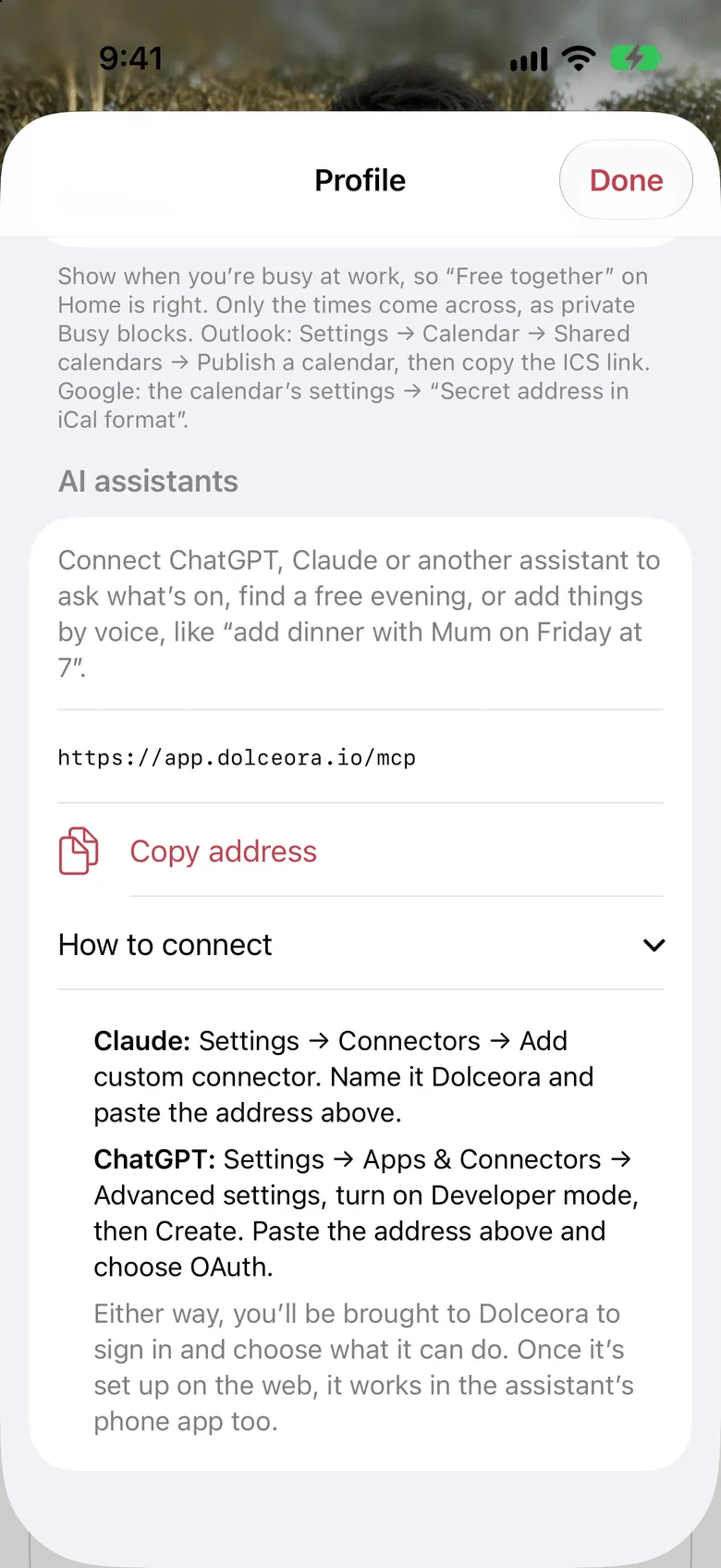
Copy one address from Dolceora into ChatGPT or Claude and sign in. After that it works in their phone apps too, by voice if you like.
An ordinary calendar answers questions. With Dolceora connected, your assistant can do the planning: check both your calendars, pick from the date ideas you’ve saved, and put the result on the calendar, all from one message.
Everything it adds is in Dolceora straight away, on both your phones. Your partner gets the same notification they would if you’d added it yourself.
Find us a free evening next week for a date night, and pick something from our date ideas.
You and Tom are both free on Wednesday and Friday evening. Tom’s on the late shift Tuesday and Thursday. From your date ideas, the ramen place on King Street fits a weeknight: it’s cheap and close by. Want me to plan it for Wednesday at 7?
Yes please. And remind me the day before.
Done. Ramen on King Street is on your shared calendar for Wednesday at 7pm, with a reminder the day before. Tom’s been notified.
There are no commands to learn. A few things people ask, in ChatGPT or Claude:
What’s on
“What have we got on this weekend?”
Both your plans, side by side, with who each one is for.
Time together
“When are we both free on a Saturday this month?”
It checks both calendars at once, so it only suggests time that works for the two of you.
From a photo
“Add this wedding invitation to our calendar, with the dress code in the notes.”
Attach a photo or screenshot of an invitation, a ticket or a flight booking, and it does the typing.
To-dos
“Turn this lasagne recipe into a shopping list on our to-dos.”
Add jobs for either of you, sort them into lists like Groceries, tick things off, and ask what’s still left.
Date nights
“Give me five ideas for a rainy Sunday under $50 and save the ones I like.”
It thinks up ideas, saves your favourites, plans one onto a free night, and can keep it a surprise.
Trips
“Plan a long weekend in the Blue Mountains in June, check we’re free, then add it.”
It plans with everything it already knows, then puts the trip on both your calendars.
Packing
“Make us a packing list for a cold weekend in Hobart, and add a present for Mum to the shopping.”
It starts from Dolceora’s ready-made packing lists, adds what your trip needs, and fills in the itinerary too.
Foodie list
“We had dinner at Ito last night. Log it with four stars, and add the dumpling place Tom mentioned.”
Save places to try, log each visit with your stars, and ask where you loved most. Your partner adds their own stars.
On this day
“What were we doing on this day in past years?”
The plans, dates and trips you had on the same day in earlier years, most recent first.
Set it up on the web, and it works wherever you use your assistant after that: on your computer, in the phone app, and by voice when your hands are full.
In Dolceora, open Profile → Connections → AI assistants and tap Copy.
In Claude, add a custom connector. In ChatGPT, create one in Developer mode.
Sign in to Dolceora, choose “only see” or “see and make changes”, and you’re done.
Dolceora news
You can now connect ChatGPT, Claude or another AI assistant to Dolceora to ask what’s on, find a free evening and add plans by voice. Here’s how to set it up.
· 3 min read
Set it up in a minute, then send your partner a code. You’ll both see whose plans are whose from day one.
Free for both of you. On iPhone, and in the browser on any phone, tablet or computer.